Instagram Transcript / File management
Keep an Instagram transcript with its source and versions
Save the source video, transcript and subtitles in one folder. Keep original exports and edited versions separate, so you can find the right files later.
Make a folder that answers a practical question
Save the source video, original-language TXT, subtitle SRT and a small manifest together. Give them one record ID, keep edits as new versions, and state which transcript each subtitle file matches. A file archive helps you retrieve the right material; it does not prove that the words are accurate or that reuse is permitted.
Months after an export, a file called transcript.txt may tell you very little. Before closing your workspace, choose a stable record ID and keep the related files together. Include a source reference that you can actually reopen, the export date, language, format and revision. If you are archiving somebody else’s material, record the permissions you actually have rather than assuming that possession of a file grants reuse rights.
For your own saved video, keep its original filename in the manifest even if you give the folder a shorter name. Put an Instagram URL there only when it is the real source. A missing URL should stay missing. Do not create a plausible-looking link to make the record look complete.
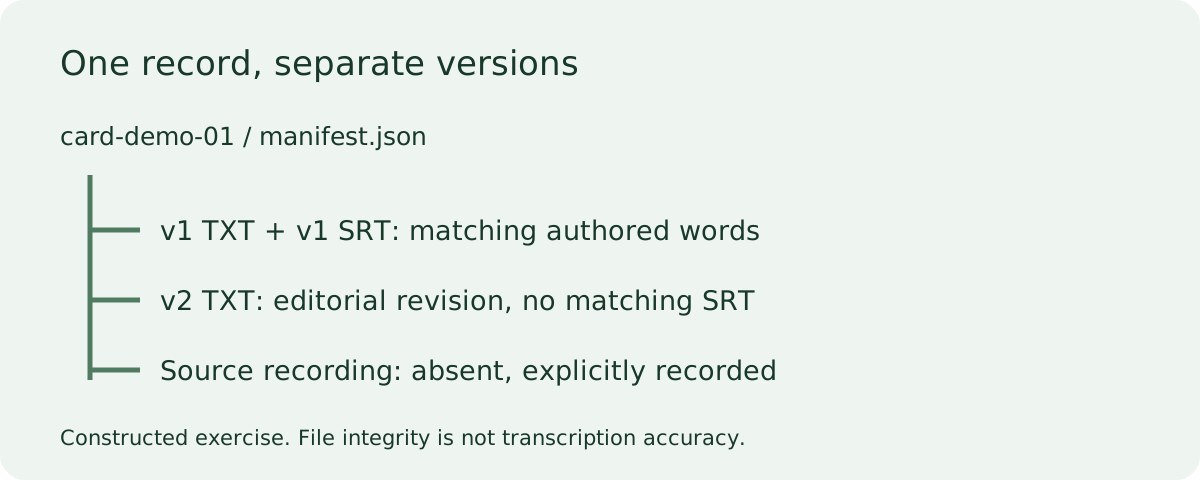
Open the constructed card-demo-01 package
We authored this text-only exercise for this guide. It contains no Instagram recording, no creator quotation and no model-generated transcript. The manifest marks both source_file and source_url as null. That absence is part of the example: a neat archive must not manufacture evidence of a source it does not contain.
The first plain-text file, reference.original.en.v1.txt, has two lines: “Fold the blue card.” and “Place it beside the cup.” Its paired reference.original.en.v1.srt carries those same two sentences in two timed cues, from zero to two seconds and two to four seconds. Those timings are invented for a structural exercise, not measured against speech. Treat them as practice data rather than usable captions for a real clip.
Next open working.original.en.v2.txt. Its second line reads “Place it next to the cup.” This is an editorial revision we deliberately introduced. There is no v2 subtitle file. The manifest records that relationship explicitly, so a reader cannot mistake the v1 subtitles for a matching export of the v2 text. Do not rename the v1 SRT to v2 just to fill the gap; a new filename would conceal the mismatch without changing its contents.
Check what the manifest can establish
Each of the three content-file entries records a filename, its UTF-8 byte length and a SHA-256 digest. Our local archive check reopened the ZIP, read those entries and compared the bytes and digests. All three matched at build time. This establishes consistency between our generated manifest and the packaged files; it says nothing about a recording, since this exercise has none.
Try changing beside to next to in a copy of the v1 text. The saved manifest then refers to the earlier bytes. Recompute the digest if you want to register a new revision, and keep the old entry as part of the history rather than silently replacing it. A matching digest detects byte identity, not whether a sentence is true. An inaccurate transcript can still have a perfectly matching checksum.
The README repeats the important limits: this is constructed practice, no audio is supplied, and the revised TXT has no matching SRT. Keep that note inside the folder when sharing the exercise. The ZIP contains exactly five files: three content files, one manifest and one README. The validation does not test subtitle playback, word alignment, recognition accuracy or ownership.
Apply the structure to a real local export
Create a fresh record folder rather than replacing the practice files in place. Copy in a video you are entitled to retain, then add the original-language exports you actually downloaded. Record translations separately with their language and revision. Keep a brief note when a text-only correction has not yet been applied to subtitles; TranscriptLeaf currently keeps edits in those views separately.
Before sharing the folder, open its media and exports from their new location. A manifest path pointing to a file left on another computer will not travel with the package. Share only the files needed by the recipient, and remove private source references from the shared copy when appropriate. Keep your private working archive separate.
Does this replace quote checking or subtitle repair?
No. This page covers finding and distinguishing files. To verify wording, use the quote-check worksheet and replay the source. To inspect timing syntax, use the SRT worked example. Neither a consistent filename nor a hash repairs a missing word or an incorrect timestamp.
Start with one folder you can reopen tomorrow. If you can identify the source, original export and latest revision without guessing, the archive is doing its job. Keep any missing counterpart visibly missing until you produce and check it.
Scope and sources
The package, diagram and version mismatch were created for this page. On November 2, 2026 we reviewed Eden Reader, which describes reading and source-linked highlights, and GetTheScript’s Instagram page, which describes copying and exporting. Neither reviewed page showed this constructed five-file local archive exercise. This is a limited page comparison, not a claim about every feature or every page of either service.